Free text to speech can mean listening in a browser or downloading an audio file. NaturalReaders supports personal reading. Luvvoice, TTSMaker, and TextSpeech offer free MP3 downloads. On TextSpeech, commercial use still requires a paid plan. Choose according to the output and rights you need.
A read-aloud session and a file for a CapCut timeline are different outputs. This comparison separates listening, downloading, and permission to publish.
Disclosure: TextSpeech publishes this article and is included in the comparison. Its Free plan includes MP3 download; commercial use starts on a paid plan.
What free TTS actually means
Free TTS usually means one of four things:
- Browser reading — NaturalReaders offers personal listening; its Free plan does not export MP3.
- Online conversion — Luvvoice and TTSMaker offer a text field and downloadable audio.
- Limited access — check usage quotas, voice restrictions, and publication terms separately.
- Free download with limits — generate, listen, and download MP3 within a character cap. This is TextSpeech's Free plan; commercial use needs a paid plan.
For listening to an article, a reader may be enough. For editing or publishing a voiceover, verify the file format and the license for your intended use.
Reviewed 14 Sep 2026: public vendor pages and help documents, plus TextSpeech's plan configuration. This was a documentation review, not a hands-on voice or download test. Unverified details are marked below; check your account and selected voice before publishing.
Free text to speech online: pick by the file
| Tool | Use case | Free MP3 download | Commercial use on free | Free limit | Check before choosing |
|---|---|---|---|---|---|
| NaturalReaders | Personal reading | No | No, personal version | Exact listening quota not verified | Separate commercial product for publication |
| Luvvoice | Short downloadable clips | Advertised | Homepage says yes; check voice terms | Homepage says 20,000 chars/month; form shows 3,000 | Account-specific limits not verified |
| TTSMaker | Downloadable audio | Yes | Yes, lawful uses | 20,000 chars/week; some voices exempt | Selected voice quota |
| ElevenLabs | Voice sampling | Web MP3 entitlement not verified | No; Starter adds a license | 10,000 credits/month | Free publication requires attribution |
| TextSpeech | Free preview and MP3 download | Yes | No | 500 chars/run | Commercial use requires a paid plan |
These are access and licensing differences, not sound-quality scores. Compare the same script in your target language before selecting a voice for a series.
To try TextSpeech voices, open Studio. For its export workflow, see text to speech MP3.
Free TTS features to check before you choose
| Feature | What to check |
|---|---|
| MP3 download | Confirm a downloadable file works in your editor. See text to speech MP3. |
| Commercial rights | Check publication, advertising, attribution, and voice-specific terms. |
| Character limit | Count the actual script, including spaces; duration alone does not determine characters. |
| Voice consistency | Keep the voice and settings fixed when comparing separate passages. |
| Regeneration control | Check whether a sentence can be replaced and whether retries consume quota. |
| Language / accent support | Test names, numbers, and pronunciation in your audience's language. |
Use the table to shortlist tools, then listen on headphones and a phone speaker at a consistent volume.
Free text to speech for reading: NaturalReaders
NaturalReaders separates personal reading from commercial voiceover creation. Choose the product according to whether you will listen privately or publish audio.
Best for: articles, PDFs, and study materials.
Free strength: a quick read-aloud in the browser.
Creator caveat: NaturalReaders says the personal AI Text to Speech app is for private listening; redistribution needs their commercial AI Voice Generator. Do not assume the personal reader license covers YouTube ads. See their subscription agreement.
Choose another product if: you need public or commercial redistribution under a personal reading license.
Free TTS download: Luvvoice and TTSMaker
Luvvoice and TTSMaker provide browser-based conversion and downloading. Their quotas and account terms differ, so check the selected voice before a large batch.
Use case: a short sample, prototype, or 15-second draft.
Luvvoice: its homepage currently lists free MP3 and commercial use. Account-specific quota and storage terms were not verified on the pricing page; confirm them before production.
TTSMaker: its public documentation permits free commercial use. Check the selected voice's allowance and keep a copy of the applicable terms.
Before a longer project: test pronunciation, pauses, and consistency on your own script. This article does not rate either tool's audio quality.
If the job is a free MP3 download, a homepage converter is a better first click than a preview-only studio.
AI voice sampling: ElevenLabs
ElevenLabs offers a free tier for trying speech generation. This review did not compare its voices with other tools or measure naturalness.
Use case: evaluating a voice before choosing a licensed production plan.
Free plan includes: 10,000 monthly credits. Credits are a usage budget, not a guaranteed audio duration.
Free plan excludes: commercial use. Starter adds a commercial license; free publication requires attribution. A later upgrade does not retroactively license earlier free generations.
Before subscribing: estimate generation and retry usage, and confirm export options in your account.
TextSpeech: free preview and MP3 download
Use TextSpeech when the script is yours and the output is a voiceover file you will keep using.
Best for: auditioning a series narrator, then downloading MP3 for your edit.
Free plan includes: 1,000 welcome credits for new users on their first login, basic generation, 500 characters per run, 1-day cloud storage, browser preview, MP3 download.
Free plan does not include: commercial use, long scripts.
Paid: Basic and Pro go to 15,000 characters per generation and add commercial use. Ultra goes to 30,000 and keeps files permanently. Details on pricing.
Try voices in Studio. Listen for pronunciation, pacing, and pauses before exporting; this article reports no retention or quality test results.
For a downloadable file, see text to speech MP3. For a channel narrator, see the YouTube AI voice generator.
Other free TTS tools worth checking
- Narakeet — limited evaluation; free accounts do not include commercial use.
- Speechify — an option to investigate for reading; current free quotas and export rights were not verified here.
- Canva / VEED text to speech — investigate if you already use that editor; current voice and export terms were not verified here.
- Microsoft Edge Read Aloud — consider for listening and proofreading; do not assume it provides audio export.
- CapCut TTS — consider within your editing workflow; verify the chosen voice's reuse and commercial terms.
Before relying on any tool, verify its export format, usage allowance, and publication rights.
Free text to speech by use case
- Study / personal listening: consider NaturalReaders.
- Short downloadable audio: compare Luvvoice and TTSMaker; confirm the terms for your chosen voice.
- Series voiceover with ads: choose a license that allows commercial use. Here, Basic or higher exports from Studio. Guide: text to speech MP3.
- YouTube tutorials: preview a narrator, then follow how to add AI voice over to YouTube.
- Shorts / TikTok: test a short script at the intended pace. See TikTok text to speech.
- Book-length narration: calculate quota, chapter workflow, and rights first. See the AI audiobook guide.
How to test a free TTS voice before paying
Step 1: choose three voices in Studio. Use the same sample of no more than 500 characters, including spaces. Record voice names and settings.
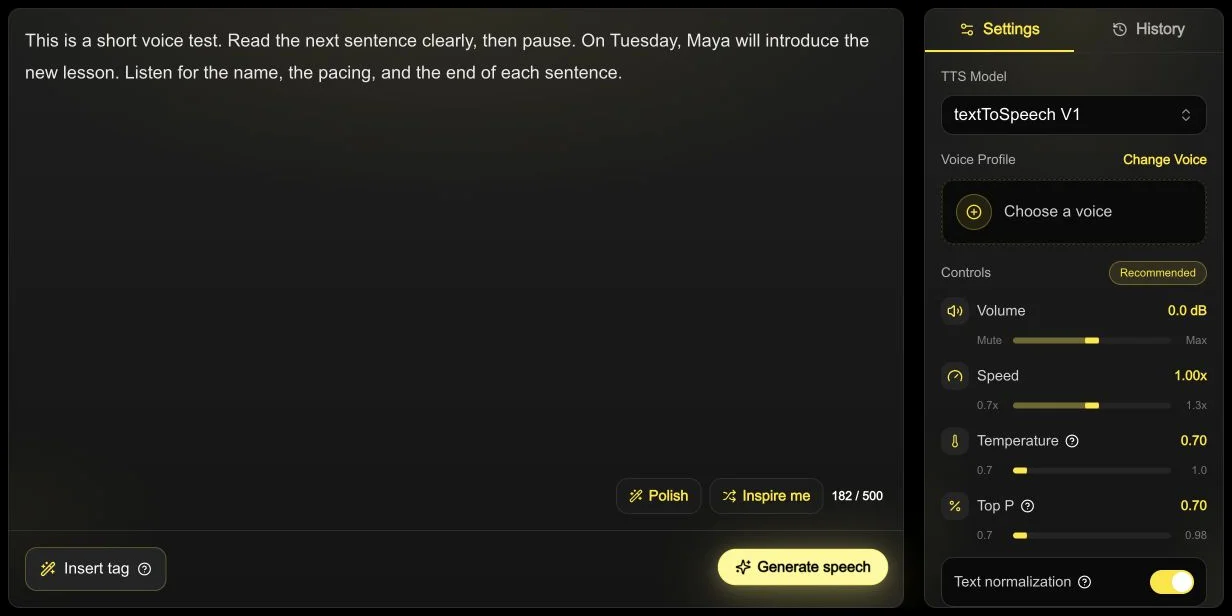
Real interface, prepared before generation: the English sample uses 182/500 characters at 1.00x. No voice has been selected and no audio has been generated. This screenshot demonstrates input preparation, not an audio-quality test.
Step 2: listen at 1.0x on headphones and a phone speaker. Note mispronounced words, awkward pauses, and volume differences.
Step 3: revise one sentence and generate again. Check consistency and record the quota used by the retry.
Step 4: when the result and license fit your project, use text to speech MP3 to export with an eligible plan, then test one file in your editor.
Step 5: review the complete video with its music and visuals. If viewers leave, investigate the script, mix, pacing, and visual edit; retention alone cannot identify a TTS cause.
These are suggested user checks, not tests performed for this article. Keep your samples and notes so the comparison can be repeated.
FAQ
What is the best free text to speech app?
It depends on the output: NaturalReaders for personal listening; Luvvoice, TTSMaker, or TextSpeech for free MP3 downloads. Test the voice and confirm the applicable license—commercial use on TextSpeech starts on a paid plan.
How do I convert text to speech to MP3 online for free?
Choose a converter that includes free MP3, such as TextSpeech, Luvvoice, or TTSMaker. Check the selected voice's quota and publication rights. See text to speech MP3.
Can I use free text to speech for YouTube?
Only if the tool’s license allows commercial or monetized use. Free preview does not always mean free commercial use. On TextSpeech, commercial use starts on a paid plan. Workflow: how to add AI voice over to YouTube.
Is free AI voice generation copyright-free?
Not automatically. You need to check the tool’s license, voice rights, and commercial-use terms. A free file can still be personal-use only.
Try a sample of up to 500 characters in Studio. Upgrade when you need MP3 download and commercial rights, after checking the voice against your script.