Short answer: AI voice over (also AI voiceover) turns a script into narration. Write for listening, preview a section, confirm commercial rights, export MP3, then edit audio-first in CapCut. Built-in TTS may also suit a series; compare voice availability, export options and current terms before choosing.
AI voice over and AI voiceover mean the same thing. Choose between an editor's built-in voice and a separate audio file based on the reuse and editing control you need.
Last updated 14 Sep 2026. Source review: official YouTube disclosure and monetization documentation checked on 14 September 2026. Voice choices and editing steps are suggestions, not results from listening tests, retention experiments or a logged-in upload test.
AI voice over vs YouTube TTS vs CapCut TTS
| Source | What it is | Good for | Weak for |
|---|---|---|---|
| AI voice over / AI voiceover (browser studio) | Script → preview → MP3 | A locked series host, commercial license, the same voice next week | Check reuse and export terms for the chosen voice |
| YouTube TTS / YouTube AI voice | Captions, auto-dub, or a voice baked into the upload flow | Accessibility and drafts | Check reuse and export terms for the chosen voice |
| CapCut TTS / CapCut voiceover | Voices inside the editor | A vertical draft, a 20-second test | Check reuse and export terms for the chosen voice |
| TextSpeech | Studio preview on Free; MP3 + commercial use on Basic and up | Audition, then export | No desktop app; 15,000 characters per paid generation |
Takeaway: Try audio-first editing: place the narration, then cut the picture to it. Confirm the selected voice and plan permit your intended use before publishing.
TextSpeech offers this workflow: browser preview → licensed MP3 export → YouTube narrator voices → timeline. This is a workflow guide, not a comparative voice-quality benchmark.
Faceless YouTube with AI voice
Faceless YouTube combines screen recordings, B-roll or slides with narration. The format alone determines neither legality nor monetization; rights, original value and platform rules still apply.
YouTube's channel monetization policy evaluates originality and authenticity. Repetitive or mass-produced content can be ineligible; a recurring format is not automatically disallowed when each video provides materially different substance. Add your own demonstration, analysis or explanation rather than merely assembling borrowed text and clips.
A consistent voice per series can make production easier. Keep a record of the voice, settings and license; a planned narrator change is also possible.
What you need
- A finished script (not bullet notes). TTS reads exactly what you type.
- TextSpeech Studio — 1,000+ voices, 11 UI languages.
- CapCut, Premiere, or DaVinci Resolve.
- Paid plan (Basic, Pro, or Ultra) if the video will run ads or needs commercial use. Free plan: up to 500 characters per generation, includes MP3 download, no commercial use. See pricing.
- Optional: Emotion tags on paid plans for emphasis without speeding the whole take.
Audition one real paragraph in Studio before you commit to a 10-minute script. If it still sounds like a blog post, rewrite for speech first.
Write the script for speech
Text to speech does not improvise. Short sentences, spelled-out numbers, and no “welcome back to the channel” throat-clearing.
| Video length | Words at 140 wpm (tutorials) | Words at 160 wpm (explainers) | Fits one Free run (500 chars)? |
|---|---|---|---|
| 60 seconds | 140 | 160 | No — use paid block or split |
| 8 minutes | 1,120 | 1,280 | No — use paid; split only if over the character cap |
| 10 minutes | 1,400 | 1,600 | No — use paid; split only if over the character cap |
Rules that change the file:
- One idea per sentence. Periods create pauses TTS respects; comma chains often do not.
- Spell what you want spoken:
10%→ten percent; product names phonetically if needed. - Put the purpose or main question near the start. Review your own audience-retention data after publication; there is no universal 12-second cutoff established here.
- Generate audio first, then cut B-roll. Fitting voiceover into locked footage creates dead air.
Worked cold open (CapCut tutorial example)
Most CapCut captions fail for one reason. You auto-caption a noisy room, then spend twenty minutes fixing names. Generate the voiceover first. Then caption the clean file.
That is 27 words (~12 seconds at 140 wpm). Generate only this block on Free to test pacing. If it cannot hold 1.0x on a phone speaker, do not generate the rest of the script yet.
Generate the AI voiceover in Studio
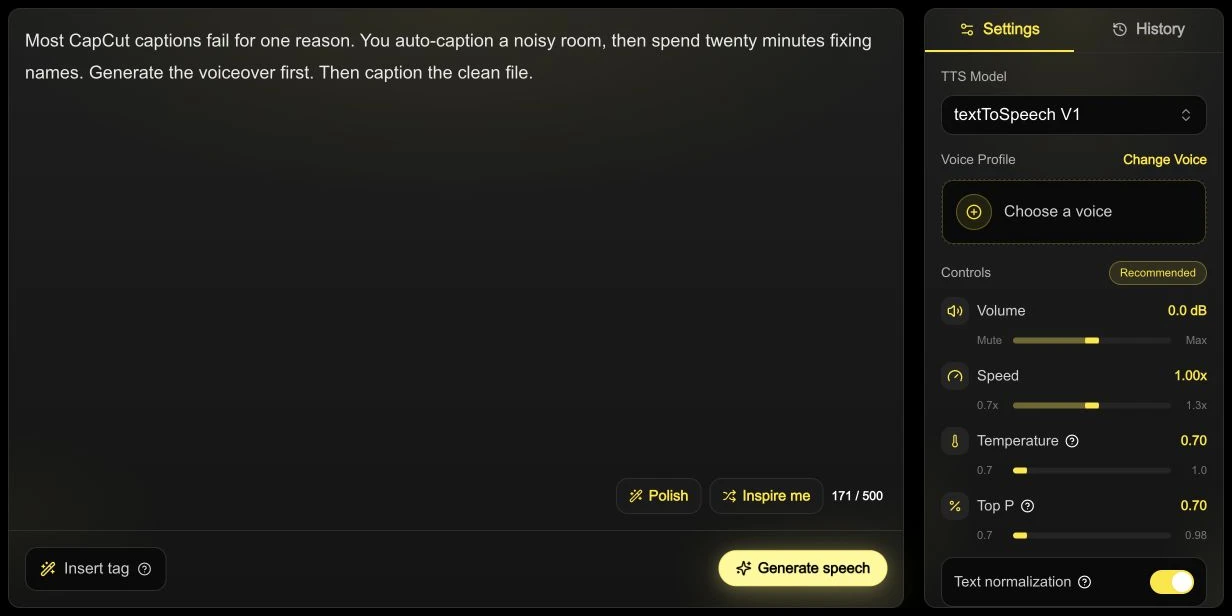
Actual Studio screenshot, English interface: the sample is 171/500 characters at 1.00x, before voice selection or generation. This shows preparation, not an audio-quality test.
- Open Studio or start from the YouTube voice generator page to filter narrator-style voices.
- Paste one section that fits your plan cap. Basic/Pro allows 15,000 characters per generation. An 8-minute English script typically fits; split only if the actual character count exceeds the cap, or optionally for easier editing.
- Compare two voices on the same paragraph at the same speed. Choose based on pronunciation and clarity; the suggestions below are starting points, not rules for a channel category.
- Preview 20–30 seconds. Adjust speed slightly (0.95–1.0x for long tutorials) before burning credits on the full section.
- Download MP3. WAV only if you will mix in a DAW.
If a word breaks, fix the text, not the whole section. Phonetic spelling plus a shorter sentence beats regenerating 1,000 words.
Voice and speed ideas to audition
| Channel | Voice direction | Speed |
|---|---|---|
| Software / how-to | Warm, clear, mid-pitch | 0.95–1.0x |
| Finance / news | Lower, steadier | 1.0x |
| Documentary / listicles | Neutral narrator; energy on hook only | 1.0x |
| Shorts-style YouTube | Brighter, shorter sentences | 1.05–1.15x |
Paid plans include Emotion tags for line-level emphasis — useful when a sentence needs energy without raising speed for the whole paragraph.
Export MP3 and respect generation caps
TextSpeech plan limits (Sep 2026):
| Plan | Characters / generation | MP3 download | Commercial use |
|---|---|---|---|
| Free | 500 | Preview only | No |
| Basic / Pro | 15,000 | Yes | Yes |
| Ultra | 30,000 | Yes | Yes |
A 10-minute YouTube script (~1,400 English words) typically fits one 15,000-character generation. Check the actual character count; split if it exceeds the cap, or optionally for editing. Name files by section: 01-hook.mp3, 02-demo.mp3, 03-close.mp3. Concatenate on the timeline.
More detail on export: text to MP3.
CapCut voiceover: importing and editing audio first
CapCut's built-in TTS may suit your workflow. If you want a separate reusable file, import an MP3 instead. Check the chosen voice's availability, export options and usage terms in your version before committing to a series.
- New project → import the Studio MP3 first. Note duration — that is your clock.
- Import screen recordings or B-roll second. Cut picture to audio.
- Split audio at section breaks (each H2 in your script) so one paragraph fix does not rebuild the whole timeline.
- Create captions from your script or correct automatic captions against it. Check product names and adjust each caption to the final audio timing.
- Lower the music while speech plays, then listen for intelligibility and check for clipping. A 12–18 dB reduction can be a starting point; the appropriate level depends on the recordings.
- Export 1080p (or 4K if source is 4K). AAC audio, 48 kHz.
Premiere and DaVinci use the same order: audio bed → picture → captions.
If you already used CapCut TTS, keep it if it meets your needs and licensing requirements. To compare an imported MP3, mute the original track, align the replacement to the start, and check timing before removing anything.
Monetize AI voiceover on YouTube
During upload, consult YouTube's AI disclosure requirements. In YouTube Studio, the current official instructions say Attributes → AI use: select Yes when your content meets the realistic, meaningful AI alteration/generation criteria, otherwise No. Not every TTS use automatically requires disclosure. Disclosure itself does not remove monetization eligibility; the channel and content must still comply with monetization policies.
Checklist before ads:
- Script and visuals are yours — not a rewritten article or scraped list.
- TTS license includes commercial / YouTube use (Basic and up on TextSpeech; Free does not).
- You exported a real MP3 from Studio — not a screen recording of the preview player.
- Captions uploaded from the script.
- Music is licensed; ducked under voice.
- AI disclosure filled in honestly where the upload flow asks.
Check rights for the script, visuals, music and chosen voice separately. A TTS subscription does not grant rights to someone else's material, and copyright clearance is separate from YouTube's reused-content review.
Common mistakes
- Selecting an energetic advertising-style voice without checking whether it suits the full tutorial.
- Pasting without checking the actual character count against the 500-character (Free) or 15,000-character (Basic/Pro) cap.
- Editing video first, then forcing TTS to fit arbitrary cuts.
- Failing to record the voice and settings, making later episodes harder to reproduce in any tool.
- 30 near-identical “top 10” videos with the same template — that is the farm pattern YouTube polices.
- Listening only on studio headphones. Phone speaker at 1.0x is the honest test.
FAQ
Does YouTube demonetize AI voices?
TTS alone does not settle eligibility. YouTube reviews the channel and its content against monetization policies, including originality and reused-content rules. Passing a licensing check is not a promise of monetization.
Can I use AI voiceover on a faceless YouTube channel?
Yes, if the video adds original value: your screen recording, your test, your edit — not a slideshow plus scraped text.
How do I add AI voiceover in CapCut?
Generate MP3 in Studio, import to CapCut, cut B-roll to the audio, caption from the script. CapCut TTS is optional for a draft. Same order in Premiere.
MP3 or WAV for YouTube?
MP3 for CapCut and YouTube upload. WAV if you EQ/compress in a DAW first.
Do I need to clone my own voice?
No. You can choose a licensed library voice. Check its terms and avoid impersonating someone without the appropriate permission.
How much does AI voiceover cost for YouTube?
Preview is free within daily check-in points. MP3 + commercial use start on Basic. A 10-minute video is roughly 1,400 English words and typically fits one 15,000-character generation. Check the actual character count; splitting is needed only above the cap and is otherwise optional for editing.
Generate the first 30 seconds in Studio. Finish the script only after that paragraph sounds like a host you would follow.